Battery Charging Time Calculator
Enter the battery capacity, how full it is and the charger current to estimate the charging time.
The Battery Charging Time Calculator estimates how long a battery takes to charge from one percentage to another, based on its capacity and your charger’s current. Enter the capacity, starting and target charge, and the charger rating, and it returns the time in hours and in hours and minutes.
The battery type selector pre-fills a charge efficiency for lead-acid, AGM, LiFePO4 and Li-ion batteries (from Battery University’s figures), so it works as a lithium ion battery charging time calculator or a lithium battery charge time calculator when you choose LiFePO4 or Li-ion. It also works as a battery charger time calculator for devices rated in watts, such as phones.
Everything runs in your browser. Nothing is uploaded, there is no sign-up, and the tool is free. Treat the result as an estimate of the time under the stated assumptions, not a guarantee.
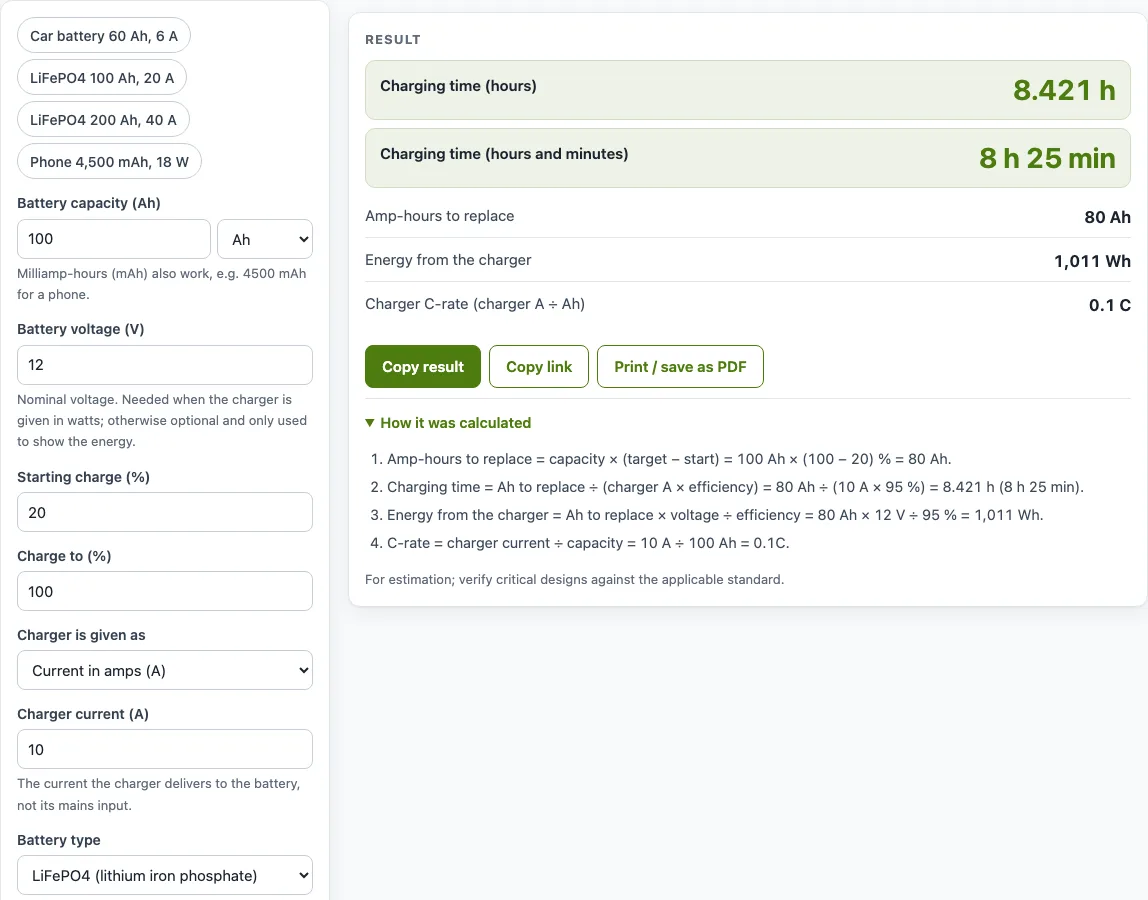
How to use the Battery Charging Time Calculator
- Enter the battery capacity in Ah. Milliamp-hours also work, for example 4500 mAh for a phone.
- Enter the battery voltage in V. This is the nominal voltage. It is required when your charger is rated in watts; otherwise it is optional and only shows the energy result.
- Enter the starting charge (%) and the charge to (%). For a battery at 20 % that you want full, enter 20 and 100.
- Open the “Charger is given as” drop-down and choose Current in amps (A) or Power in watts (W).
- Enter the charger current (A) or charger power (W), whichever field appears. Use the current the charger delivers to the battery, not its mains input.
- Choose the battery type. This only pre-fills the charge efficiency.
- Check the charge efficiency (%). Leave it blank to use the pre-filled value, or type the figure from your battery’s data sheet. Under More options you can also enter the maximum charge current from the data sheet.
- Read the result and any warning shown beneath it.
The example buttons above the form load ready-made setups, such as a 60 Ah car battery on 6 A, and Reset restores the starting example. Below the result, “How it was calculated” shows every step with your numbers. Copy link stores all inputs in the page address, so the same calculation reopens later. Print / save as PDF produces a copy with inputs, results, steps and the date.
How do you calculate battery charging time?
Divide the amp-hours you need to add by the useful current the charger delivers to the battery. The formula is charging time (h) = amp-hours to replace ÷ (charger current × charge efficiency), where amp-hours to replace = capacity × (target % − start %).
Take a 100 Ah LiFePO4 battery going from 20 % to 100 %. It needs 100 × 0.80 = 80 Ah. A 10 A charger at 99 % efficiency delivers 10 × 0.99 = 9.9 A of useful current, so 80 ÷ 9.9 = 8.081 hours, or 8 h 5 min.
Charge efficiency accounts for charge that goes in but cannot be taken out again (coulombic efficiency). The pre-fills follow Battery University: about 90 % for lead-acid and AGM, and 99 % for LiFePO4 and Li-ion, whose coulombic efficiency is normally better than 99 %. If your charger is rated in watts, convert to amps first with A = W ÷ V. A 600 W charger on a 12 V battery is 50 A.
What C-rate should I charge at?
Charge at a C-rate that your battery’s data sheet allows. C-rate is the charger current divided by the battery capacity, so a 10 A charger on a 100 Ah battery is 0.1 C. A rate of 1 C means a current equal to the capacity number in amps, which is 100 A for a 100 Ah battery.
Higher C-rates shorten charging time but produce more heat and stress the battery. The calculator shows “Charger C-rate (charger A ÷ Ah)” in its results. Limits differ from one battery to another, so it has no built-in limit: enter the maximum charge current from your battery’s data sheet under More options, and the calculator warns when the charger current is higher.
Why charging takes longer than the simple estimate
The formula assumes the charger delivers its full current the whole time. Lithium batteries mostly do, apart from a short taper at the very top. Lead-acid batteries switch to an absorption stage near full, where the current falls, so the last part of the charge takes noticeably longer than the estimate, and the charger may also hold a float stage afterwards.
Worked examples
| Input | Result |
|---|---|
| 100 Ah, 20 → 100 %, 10 A | 8.081 h (8 h 5 min) |
| 60 Ah, 50 → 100 %, 6 A | 5.556 h (5 h 33 min) |
| 200 Ah, 20 → 100 %, 40 A | 4.04 h (4 h 2 min) |
| 200 Ah, 20 → 100 %, 600 W | 3.232 h (3 h 14 min) |
| 4500 mAh, 0 → 100 %, 18 W | 0.9722 h (58 min) |
Calculated by the tool above with these values.
Frequently asked questions
How long does it take to charge a battery?
It depends on the capacity, how much charge you add, and the current the charger delivers after efficiency. The calculator’s example for a 4500 mAh phone battery on an 18 W charger, from 0 to 100 %, gives about 58 min.
How long to charge a 100Ah battery with a 10 amp charger?
From 0 to 100 % on LiFePO4 at 99 % efficiency, it takes 100 ÷ 9.9 = 10.1 hours, about 10 h 6 min. Lead-acid at 90 % efficiency takes about 11 h 7 min, and the real time is longer near full.
Why is the real charging time longer than the result?
Lead-acid and AGM batteries charge more slowly over the last part of the charge, the absorption phase, where the charger holds the voltage and the current tapers. That last part can take noticeably longer than the simple estimate. Li-ion devices such as phones also slow down near full, so real time is slightly longer too.
Can I enter a charger rated in watts?
Yes. Set “Charger is given as” to Power in watts, then enter the watts and the battery voltage. The tool converts the rating with A = W ÷ V, and the battery voltage is required in this mode.
Is the result exact?
No. The result is an estimate for planning. Your battery’s age, temperature and charger behaviour can change the real time. For critical designs, verify against the applicable standard.
Can I use the results in a quote or report?
Yes. Results, including numbers, charts and printouts, can be used freely in commercial work such as quotes, proposals, reports and service records. No attribution is needed.
Related tools
- Battery runtime calculator: use it to estimate how long a battery will power a load once it is charged.
- Amp hour calculator: use it to convert between amps, hours and amp-hours when you need the capacity figure first.
- Solar panel output calculator: use it to estimate how much energy a panel produces to charge your battery.
- Solar battery size calculator: use it to work out the battery capacity a solar system needs.
- Battery voltage chart: use it to check the voltage of a battery at different states of charge.
- All solar and battery calculators: use it to browse every calculator on the site.
Sources
- Battery University BU-808c: coulombic efficiency of lead-acid and lithium-ion