Solar Charge Time Calculator
Enter the battery capacity, the charge range, the panel watts and your sun hours to see how long the panel needs.
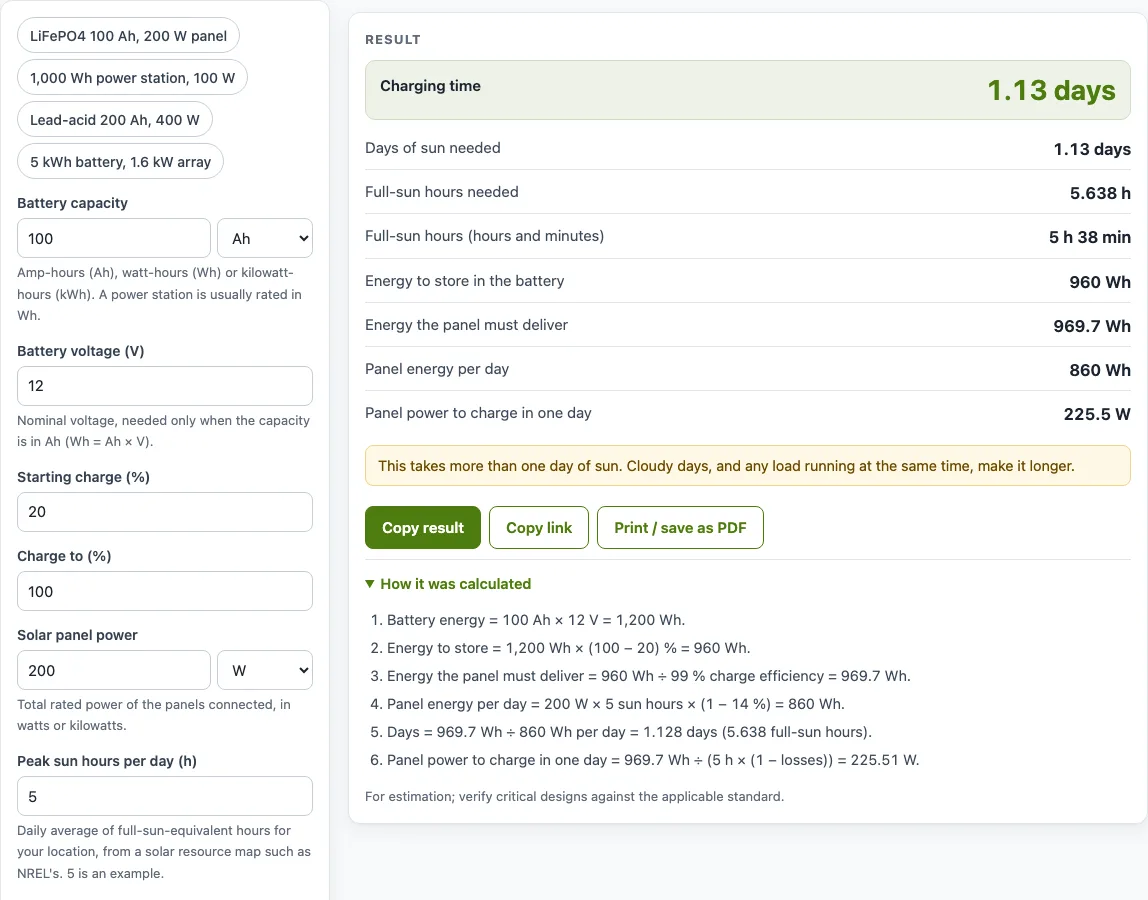
How to use the Solar charge time calculator
- Enter the battery capacity and choose its unit: Ah, Wh or kWh. A power station is usually rated in Wh, so enter that figure directly.
- If you chose Ah, enter the battery voltage (V). This field appears only for Ah, because Wh = Ah × V.
- Enter the starting charge (%) and the charge to (%). For example, 20 and 100.
- Enter the solar panel power in W or kW. This is the total rated power of the panels connected.
- Enter the peak sun hours per day for your location. Use a solar resource map such as NREL’s. The value 5 is only an example. Values below 2 or above 8 trigger a warning.
- Choose the battery type from the drop-down. This only sets the charge efficiency under More options.
- Under More options you can change the charge efficiency (blank uses the value for your battery type) or the system losses (14 % by default).
- Read the results: charging time, full-sun hours needed, energy to store, energy the panel must deliver, panel energy per day and panel power to charge in one day. The “How it was calculated” section below shows every step with your numbers.
The example buttons above the form load preset setups. Copy link saves every input in the page address, so the same calculation reopens later. Copy result gives the result lines with a link. Print / save as PDF includes the inputs, results, steps and date. Reset restores the starting example.
How long does it take a solar panel to charge a battery?
Charging time is the energy the battery needs divided by the energy the panel delivers each day. The energy to store is the battery capacity in Wh multiplied by the difference between the target and starting charge. For a 100 Ah, 12 V LiFePO4 battery going from 20 % to 100 %, the capacity is 1,200 Wh, so the energy to store is 1,200 × 0.80 = 960 Wh.
Lead-acid and AGM batteries slow down near full, in the absorption stage. The real time to full is longer than the estimate for those types.
How do you calculate solar panel charging time?
Work through four steps. First, find the energy to store. Second, divide it by the charge efficiency to get the energy the panel must deliver: 960 ÷ 0.99 ≈ 970 Wh for LiFePO4. Third, find the panel energy per day: panel watts × peak sun hours × (1 − system losses). A 200 W panel with 5 sun hours and 14 % losses gives 200 × 5 × 0.86 = 860 Wh per day. Fourth, divide the energy to deliver by the panel energy per day: 970 ÷ 860 ≈ 1.13 days.
The calculator also reports this as full-sun hours needed, which is 970 ÷ (200 × 0.86) ≈ 5.64 hours.
How many solar panels do I need to charge a battery in one day?
Find the panel power that charges the battery in one day by dividing the energy to deliver by the peak sun hours multiplied by (1 − system losses). In the example above, 970 ÷ (5 × 0.86) ≈ 226 W. The calculator shows this as panel power to charge in one day. To turn that into a panel count, divide by the rating of one panel and round up. With 200 W panels, that is two panels.
How long does a solar panel take to charge a power station?
Power stations are usually rated in Wh, so enter that value as the battery capacity. For example, a 1,000 Wh power station going from 0 % to 100 % with a 100 W panel and 5 sun hours needs about 2.58 days. This worked example is the “1,000 Wh power station, 100 W” example button, which sets the charge efficiency to 90 % under More options. The energy to deliver is 1,000 ÷ 0.9 ≈ 1,111 Wh, and the panel delivers 100 × 5 × 0.86 = 430 Wh per day.
Worked examples
| Input | Result |
|---|---|
| 100 Ah, 20 → 100 %, 200 W, 5 sun hours | 1.128 days (5.638 full-sun hours) |
| 1000 Wh, 0 → 100 %, 100 W, 5 sun hours | 2.584 days (12.92 full-sun hours) |
| 200 Ah, 50 → 100 %, 400 W, 4 sun hours | 0.969 days (3.876 full-sun hours) |
| 5 kWh, 20 → 100 %, 1.6 kW, 4.5 sun hours | 0.6525 days (2.936 full-sun hours) |
Calculated by the tool above with these values.
Frequently asked questions
Does a cloudy day change the charging time?
Yes. Cloudy days give fewer full-sun hours than your peak sun hours value, so charging takes longer. Any load running at the same time also makes charging longer.
What if I only know my battery’s amp-hour rating?
Enter the capacity in Ah and the nominal battery voltage in V. The calculator uses Wh = Ah × V to convert the value. The nominal voltage is usually printed on the battery label.
Is the result an exact time?
No. It is an estimate based on your inputs, and the real time depends on weather and on the battery’s charging stages.
Does shading change the result?
Yes. Shading on the panel lowers its output, so the real charging time is longer. Raise the system losses under More options to account for it.
Can I use kilowatt-hours and kilowatts?
Yes. Battery capacity can be entered in kWh, and panel power in kW. For example, a 5 kWh battery charged from 20 % to 100 % by a 1.6 kW array with 4.5 sun hours takes about 0.65 days.
Does the tool upload my numbers?
No. The calculator runs entirely in your browser, and nothing you enter is uploaded. No sign-up is needed.
Related tools
- Battery charging time calculator: use it when your charging source is not solar.
- Solar battery size calculator: use it to work out how large a battery you need for your daily use.
- Solar panel output calculator: use it to estimate how much energy a panel array produces.
- Solar charge controller calculator: use it to size the charge controller for your panels.
- mAh to Wh converter: use it when a battery is labelled in mAh and you need watt-hours.
- All solar and battery calculators: use it to browse every calculator on the site.
Sources
- Battery University BU-808c: coulombic efficiency of lead-acid and lithium-ion
- NREL PVWatts Version 5 Manual (Dobos 2014, NREL/TP-6A20-62641) — default system losses 14 % and inverter efficiency 96 %, summarised by Aurora Solar
- Wh = Ah × V; the definition of the watt-hour is in NIST SP 811, Appendix B.8