Solar Panel Output Calculator
Enter the panel or array wattage and your peak sun hours to estimate how many kWh it produces per day, month and year.
The solar panel output calculator estimates how much electricity a solar panel or array will produce per day, month and year. Enter the panel or array rating, the number of panels, your peak sun hours and system losses, and the results update on the page. It runs in your browser, free and without sign-up.
Use it to size a system, compare panel options or check a quote before you buy; it works the same as a PV panel output calculator for a single module or a whole array. Along with energy in kWh, the results can show average power over 24 hours and capacity factor, which tell you how much of the rated power your array delivers across a full day. If you add temperature data, the calculator also shows the effect of hot cells on output.
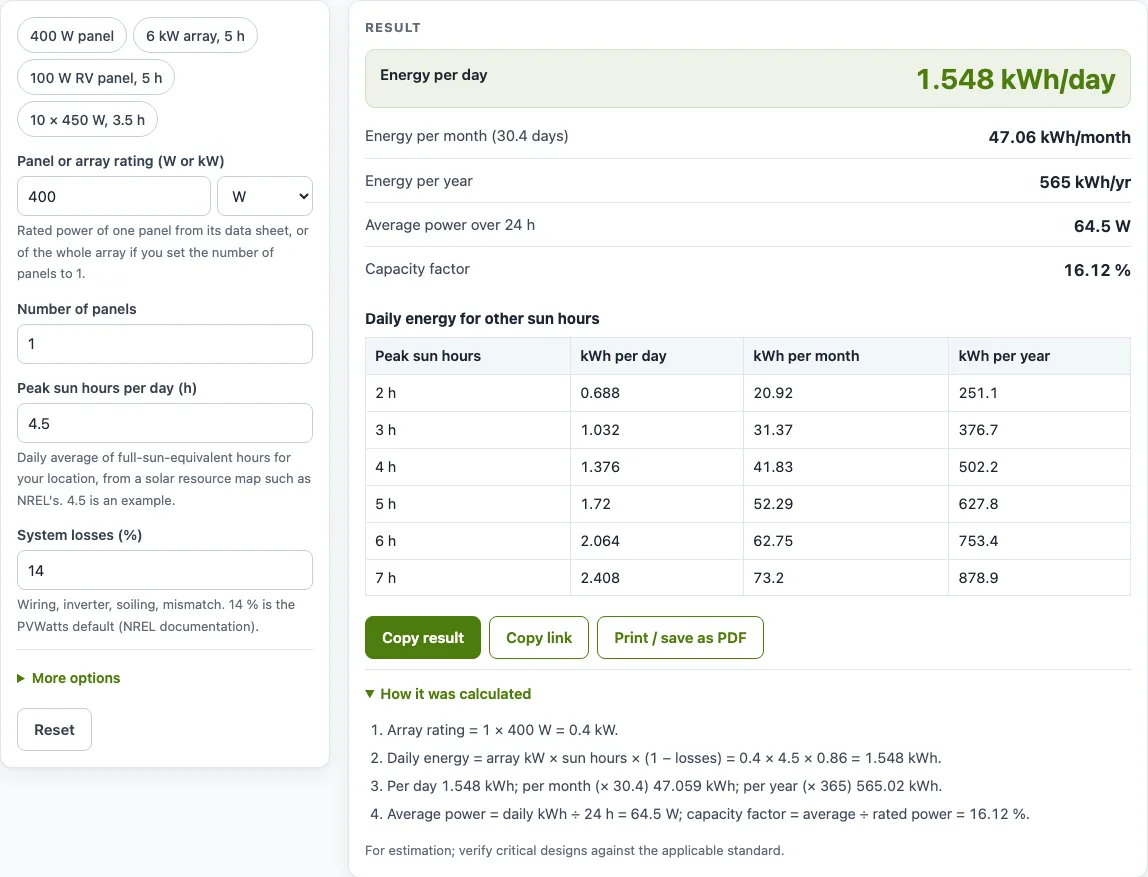
How to use the Solar panel output calculator
- In the “Panel or array rating (W or kW)” box, enter the rating and choose W or kW. Use the rated power of one panel from its data sheet, or the rating of the whole array if you set the number of panels to 1.
- Enter the “Number of panels”.
- Enter “Peak sun hours per day (h)”. Use the daily average for your location from a solar resource map such as NREL’s. The default 4.5 is an example.
- Check “System losses (%)” and “Inverter efficiency (%)”. The defaults, 14 % and 96 %, are NREL PVWatts’ defaults. Use 100 % for a DC-only system.
- Optional: open “More options”. Enter the “Pmax temperature coefficient (%/°C)” from the panel data sheet, such as −0.35 (the CertainTeed CTM10400HC11-06 value). Then enter the “Average cell temperature” in °C or °F. Leave the coefficient blank to skip the temperature effect.
- Read the results: Energy per day, Energy per month (30.4 days), Energy per year, and any of Average power over 24 h and Capacity factor that apply to your chosen mode.
- Open “How it was calculated” to see every step with your numbers.
The example buttons above the form load preset setups, such as a 400 W panel, a 6 kW array and a 10 × 450 W array. Copy result copies the result lines with a link. Copy link stores every input in the page address, so the same calculation reopens later. Print / save as PDF produces a file with your inputs, results, steps and the date. Reset restores the starting example.
How do you calculate solar panel output?
Multiply the array rating in kW by the peak sun hours per day, then reduce the result by the system losses. The formula is: daily energy (kWh) = array rating (kW) × peak sun hours × (1 − losses). Monthly energy is daily energy × 30.4, and yearly energy is daily energy × 365.
Take one 400 W panel. That is 0.4 kW. With 4.5 peak sun hours, NREL PVWatts’ default 14 % system losses and its 96 % inverter efficiency, the daily energy is 0.4 × 4.5 × 0.86 × 0.96 = 1.486 kWh. Over 30.4 days that comes to 45.18 kWh, and over 365 days it comes to 542.4 kWh.
Peak sun hours are not the hours of daylight. They are full-sun-equivalent hours: the number of hours at 1,000 W/m² that would deliver the same daily energy as the real, changing sunlight. The value depends on your location, the season and the tilt of the panels. Average power over 24 hours is the daily energy divided by 24. For the 400 W example, 1.486 kWh ÷ 24 is about 61.9 W, and capacity factor (average power ÷ rated power) is 61.9 ÷ 400, or about 15.5 %.
Why do solar panels produce less than their rating?
Panel ratings are measured at standard test conditions (STC): 1,000 W/m² of light and a cell temperature of 25 °C. Real conditions often differ, so output is commonly below the nameplate figure. The system losses input covers soiling, shading, mismatch, wiring, connections, light-induced degradation, nameplate tolerance and availability (14 % in PVWatts), and the inverter efficiency input covers the inverter (96 % in PVWatts).
Heat is another cause. Silicon panels normally have a negative power temperature coefficient, which means they lose output as the cells warm up. The optional derating uses this formula: derate = 1 + coefficient × (cell temperature − 25 °C). With a coefficient of -0.35 %/°C and a cell at 45 °C, the derate is 1 + (−0.35 % × 20) = 0.93, so the panel produces about 93 % of its rated power. If the calculator warns that the coefficient is positive, check the sign on the data sheet.
Worked examples
| Input | Result |
|---|---|
| 1 × 400 W, 4.5 sun hours, 14 % losses, 96 % inverter | 1.486 kWh per day, 542.4 kWh per year |
| 1 × 6 kW, 5 sun hours, 14 % losses, 96 % inverter | 24.77 kWh per day, 9,040 kWh per year |
| 1 × 100 W, 5 sun hours, 14 % losses, 96 % inverter | 0.4128 kWh per day, 150.7 kWh per year |
| 10 × 450 W, 3.5 sun hours, 14 % losses, 96 % inverter | 13 kWh per day, 4,746 kWh per year |
| 1 × 400 W, 4.5 sun hours, 14 % losses, 96 % inverter | 1.33 kWh per day, 485.5 kWh per year |
Calculated by the tool above with these values.
Frequently asked questions
How much power does a solar panel produce per day?
It depends on the panel rating, the peak sun hours at your location and the system losses. A 400 W panel with 4.5 peak sun hours, 14 % losses and a 96 % inverter produces about 1.486 kWh per day. The calculator shows the same figure for any combination you enter.
How many kWh does a 400 W solar panel produce?
With 4.5 peak sun hours, 14 % losses and a 96 % inverter, a 400 W panel produces about 1.486 kWh per day, about 45.18 kWh per month and about 542 kWh per year. Change the sun hours to match your location for a more accurate figure.
How do you calculate solar panel output?
Multiply the rating in kW by the peak sun hours per day, then by (1 − losses) and by the inverter efficiency. For example, 0.4 kW × 4.5 h × 0.86 × 0.96 gives 1.486 kWh per day.
Why do solar panels produce less than their rating?
Ratings are measured at 1,000 W/m² and a 25 °C cell temperature, which real days often do not match. Hot cells, wiring losses, the inverter, dirt and panel mismatch all reduce the output you actually get.
What is a typical value for peak sun hours per day?
There is no single typical value: it depends on location, season and tilt, so read it from a solar resource map such as NREL’s (a daily solar resource in kWh/m² equals peak sun hours). The calculator asks you to double-check values below 2 or above 8 hours.
Can I use the results in a quote or report?
Yes. Results, charts and printouts can be used freely in commercial work such as quotes, proposals, reports and service records, with no attribution needed. The note under every result says the figures are for estimation, so verify critical designs against the applicable standard.
Related tools
- Solar panel calculator — Use it for a general first estimate of panel and system size.
- Solar panel angle calculator — Use it to work out the tilt angle for your panels.
- Solar battery size calculator — Use it to size a battery to store the energy your panels produce.
- Solar charge controller calculator — Use it to choose a charge controller rating for your array.
- Battery charging time calculator — Use it to estimate how long a battery takes to charge from your panels.
- All solar and battery calculators — Use it to browse every calculator on the site.
Sources
- NREL PVWatts Version 5 Manual (Dobos 2014, NREL/TP-6A20-62641) — default system losses 14 % and inverter efficiency 96 %, summarised by Aurora Solar
- CertainTeed CTM10400HC11-06 data sheet: example 400 W module (Voc 37.04 V, Isc 13.79 A, Vmp 31.01 V, −0.27 %/°C Voc, 1722 × 1134 mm)